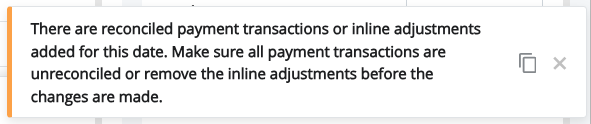
The Payments section of Daily Activity can be updated, however all deposits must first be unreconciled. If you attempt to make changes to the Payments section, you may receive this error message:
What this Error Means
This error appears when one or more deposits or adjustments for the selected date are currently marked as reconciled. All deposits and adjustments must be unreconciled before changes can be made to the Payments section of Daily Activity.
Before you Begin
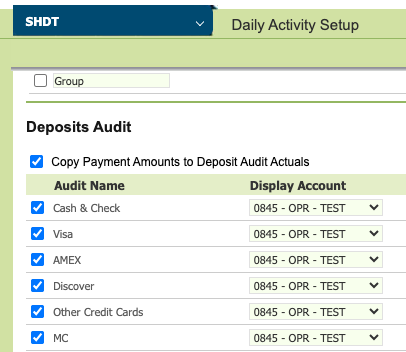
Review the Daily Activity Setup page > Deposit Audit section to identify which bank accounts deposits are routed to. You will need to review the reconciliation page for each of those accounts.
Steps to Resolve
- Open the Daily Activity Setup page and note all bank accounts that deposits are routed to. All listed accounts will need to be reviewed.
- Navigate to the Reconciliation page for each bank account that Daily Activity Deposits may be found in. Repeat this process for each account identified in Step 1.
- Expand every Deposit Section and scroll to the date shown for the Daily Activity error. Look for any deposits marked as reconciled — these appear with a green checkmark.
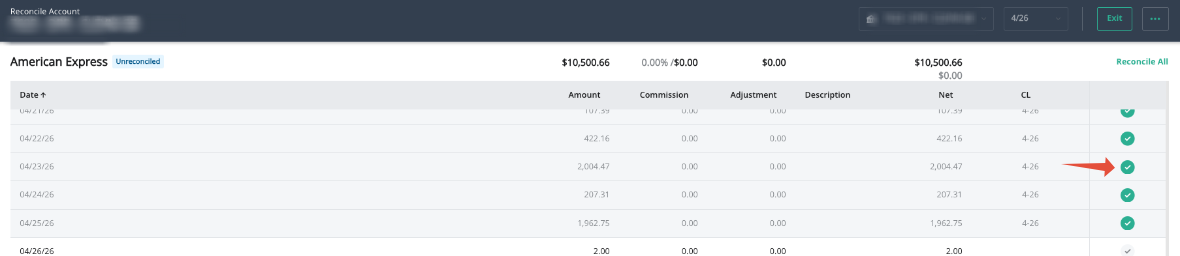
- Deselect any deposits that are marked as reconciled for that date.
- In addition to deposits, check the reconciliation page, and the deposits audit section of Daily Activity for any adjustments associated with that date, un-reconcile and remove/delete them.
- Once all deposits are unchecked and adjustments are removed, return to the Payments section in Daily Activity and make the necessary changes.
- After your changes are successfully saved, return to the reconciliation page and re-check any deposits that have cleared.
Remember to review all bank accounts that deposits are routed to — missing even one account can prevent the error from clearing.
Was this article helpful?
That’s Great!
Thank you for your feedback
Sorry! We couldn't be helpful
Thank you for your feedback
Feedback sent
We appreciate your effort and will try to fix the article