See below for more details into the enhancements released:
TABLE OF CONTENTS
- Accounting - Daily Activity Entry 2.0 Now Available!
- Business Intelligence - Daily Snapshot Report
- Labor Management - Time Off Policies - Annual Accrual Limits
- Labor Management - Pay Per Room (PPR) for Housekeepers
- Labor Management - New Calculation Engine for FLSA Compliance Changes
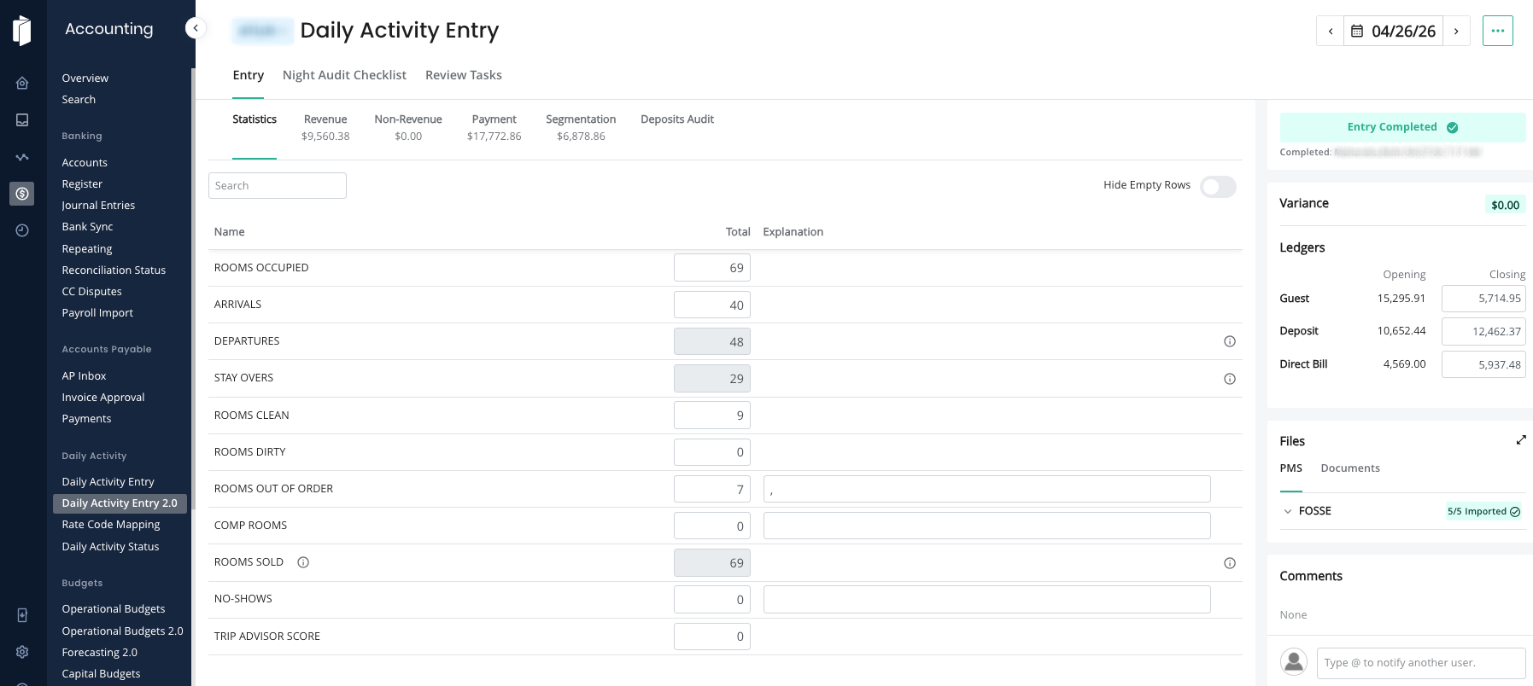
Accounting - Daily Activity Entry 2.0 Now Available!
We've completely redesigned the Daily Activity Entry experience to make your daily workflow faster, easier, and more reliable. Whether you're a seasoned manager or a night auditor logging in for the first time, the updated interface is built to guide you through each step with confidence.
What's New:
- Redesigned interface - A cleaner, more intuitive layout that simplifies the entire daily activity entry process from start to finish.
- Improved charge & rate code mapping - Unmapped items are now clearly surfaced, and creating or assigning codes is straightforward, so your reports stay accurate without the guesswork or need for a support ticket.
- Easier training for new staff - The streamlined workflow means night auditors and other team members can get up to speed quickly with minimal hand-holding.
- Fewer errors, fewer support cases - The new design guides users through each step, making common mistakes harder to make so you can spend less time troubleshooting.
Business Intelligence - Daily Snapshot Report
A new Daily Snapshot Report is now available in the report selector. It delivers a single-property, daily operating view of the hotel's performance against budget and, where data allows, against last year, including rate code and segmentation-level breakouts.
- Provides a daily view of rooms revenue, other revenues, and rate code performance for a selected property, compared to budget.
- A toggle allows the report to include budget variances for comparison
- Breaks out rate codes and segmentation by Occupancy, ADR, and RevPAR.
- Includes a next-seven-day quick-stats section when forecast data is available.
- The report can be scheduled and delivered to a user's inbox on a daily basis.
- Single-property selection per report. Multi-property selection is not supported at this time.
Important - data prerequisite for comparisons: Last-year variance data will only appear for customers who have imported their prior-year statistics by day. Customers who have statistics by month (a common choice) will see comparison data as monthly divided by number of days in the daily output.
Labor Management - Time Off Policies - Annual Accrual Limits
Time Off Policies under Labor now support setting a maximum number of hours an employee can accrue per year under accrual-based policies that use the “Track Time-Off By Hours Worked” setting.
- A new field, “What is the maximum number of hours per year an employee can be awarded?” has been added to the PTO Policy Editor. It is only visible when accrual is enabled and “Track by Hours Worked” is toggled on. The field is optional; if left blank, only the existing total balance cap will apply.
- Once an employee reaches the annual limit; the system stops awarding additional hours until the cap resets. The reset time is based on the employee’s anniversary (or hire) date, independent of the total accrued balance cap.
- The annual accrual cap cannot exceed the total accrued hours cap. If it does, the system will display a validation error that says “Yearly accrual cap cannot exceed total balance cap.” For this field, only whole numbers are accepted.
Labor Management - Pay Per Room (PPR) for Housekeepers
The Labor module now supports Pay Per Room (PPR) calculations for housekeeper positions, using a service-level default rate with optional per-employee overrides.
- A default rate per service level can be configured at the labor model. This is the rate used when an individual employee does not have their own PPR rate set.
- Individual employees can have a PPR rate set on their employee record, which overrides the default for their wages.
- Dashboard labor cost and gross wage calculations pull from the individual employee's rate when specified and fall back to the model by default otherwise.
- PPR fields appear only when PPR is enabled for the housekeeper position in the labor model.
Note: This feature is not currently enabled for all customers.
Labor Management - New Calculation Engine for FLSA Compliance Changes
The new Calculation Engine introduces several changes to how overtime and wages are calculated to bring Inn-Flow into compliance with FLSA requirements.
- Blended Overtime Rate: When an employee works multiple positions at different rates, within the same work week, overtime is now calculated using a weighted average (blended) rate (total standard time earnings divided by total hours worked) rather than a single position’s hourly rate. The OT rate is 1.5x that blended rate.
- Mid-Shift OT Threshold Handling: If an employee crosses the 40-hour threshold mid-shift, hours up to the threshold are paid at the standard time and only hours beyond it are paid at the OT rate. Previously, this situation was not handled by the system at all.
- FEIN Grouped Overtime: For hotel groups sharing a FEIN, overtime is calculated by aggregating hours and earnings across all properties across that FEIN, not per individual property as it was in the past. This reflects the FLSA requirement that overtime must be calculated per employer entity.
- PPR Overtime Compliance: PPR (Pay Per Room) employees are now subject to FLSA piece-rate overtime rules. Their punch hours are tracked and evaluated for overtime eligibility the same as hourly employees. IF they exceed 40 hours, an overtime premium is calculated using their total PPR earnings divided by total hours worked, with a 0.5x that regular rate applied as a premium for each overtime hour.
- California and Colorado State-Specific OT Calculations: The engine now supports daily overtime rules for California (1.5x after 8 hours a day, 2x after 12 hours a day, and special 7th consecutive day rules), as well as Colorado (1.5x after 12 hours a day).
Note: This feature is not currently enabled for all customers.
Was this article helpful?
That’s Great!
Thank you for your feedback
Sorry! We couldn't be helpful
Thank you for your feedback
Feedback sent
We appreciate your effort and will try to fix the article