Forecasting in Inn-Flow lets you project future financial performance based on current trends, updated assumptions, or known upcoming changes. While a budget is typically set once at the start of a fiscal year, a forecast is a rolling estimate that you can update as conditions change throughout the year.
Budget vs. Forecast
A budget is your annual financial plan — it sets targets for revenue and expenses at the beginning of the year. A forecast is a forward-looking projection that incorporates actual results to date and adjusts future expectations accordingly. Forecasts are typically updated monthly or quarterly to keep financial planning aligned with reality.
Creating a Forecast
1. First, complete your Operational Budget, and update the status to “Locked”
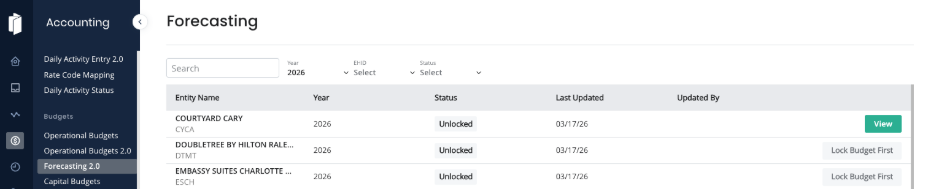
2. Navigate to Accounting > Forecasting 2.0.
3. Click View beside the Entity that you’d like to Forecast.
4. Review and Forecast Room Revenue. To do so, click on the Room Revenue Tab. Review the budget entries for Occupancy, ADR, and Segmentation Mix. Adjust these accordingly, either by selecting each section separately or by exporting the template, making multiple changes, then re-importing.
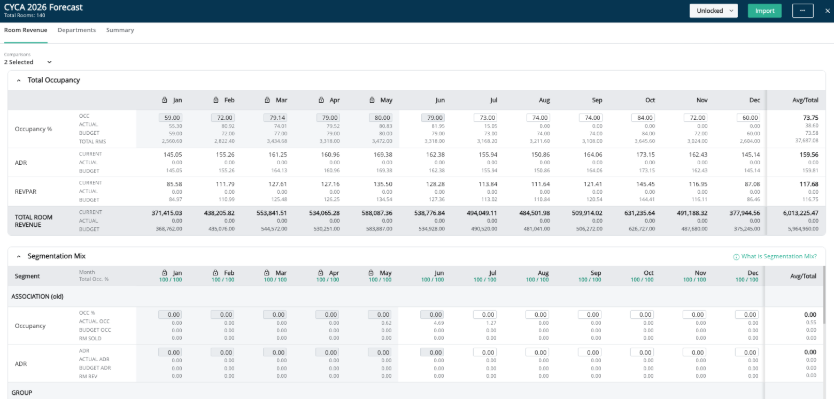
For more information on how to update Room Revenue Budgets see article: Editing Room Revenue in Operational Budgets 2.0
5. To make updates to your Departmental Budget Forecast, use the Departments Tab. Any chart of account that is budgeted by factor method - which depends on occupancy, revenue, or a related chart of account - will automatically recalculate based on the changes made to your Room Revenue Forecast.
Any amounts budgeted by period will need to be manually updated.
For more information on how to update Departmental Budgets see article: Editing Departmental Budgets in Operational Budgets 2.0
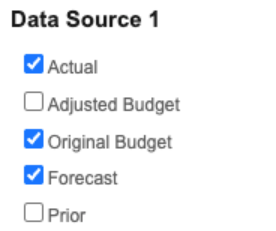
6. To see where you stand, run an Operating Statement with available settings like by chart of account, hide rows with zero values, and either dollars, percent, and/or POR. Updating the selections in Data Source 1 will allow you to compare your Actuals to your Original Budget, and to your Forecast.
Key Forecasting Features
• Actuals + projection — Blend year-to-date actual results with projected figures for remaining months.
• Report integration — Use forecasts as a comparison column in financial reports alongside budget and actuals.
• Flexible updates — Revise forecast figures at any time without affecting your original or adjusted budget.
Was this article helpful?
That’s Great!
Thank you for your feedback
Sorry! We couldn't be helpful
Thank you for your feedback
Feedback sent
We appreciate your effort and will try to fix the article