See below for more details into the enhancements released:
TABLE OF CONTENTS
- Accounting - Marriott ‘Power of M’ Agilysys STAY PMS Integration is Live
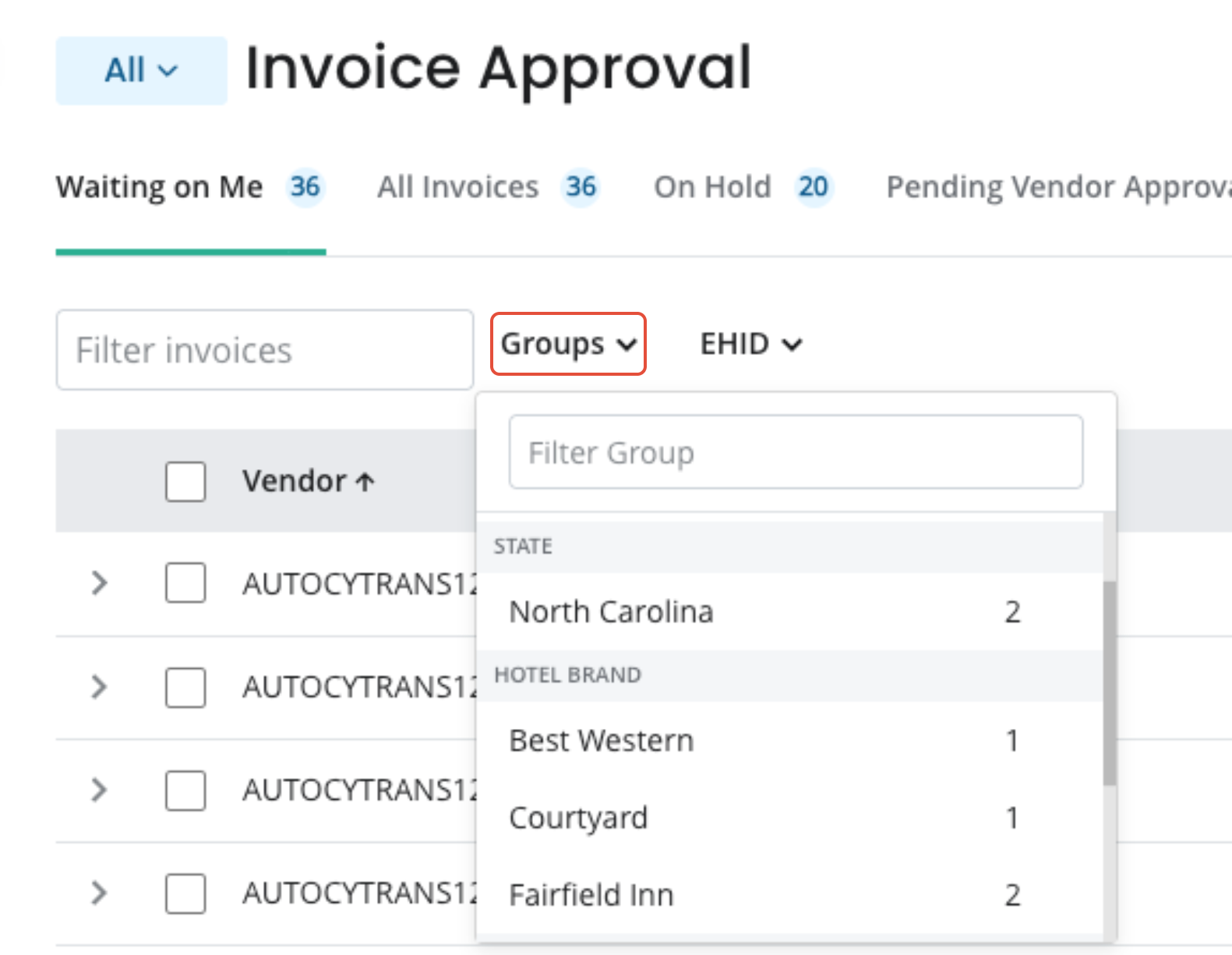
- Accounting - AP Invoice Approval: New Groups Filter
- Reimbursements 2.0: Create Enterprise Reimbursements from the Enterprise View
- Labor - New Paylocity Payroll Export Template
- Labor - Grouped FEIN Payroll Export for External Processors
- Labor Reports Now Powered by the New Calculation Engine (including PPR)
- Labor Management - Performance Page: Remembers Your Filter Selection
- BI: Deposit Audit Total Adjustment Values Shown per Column
- Accounting Reports: Daily Snapshot Report Includes LY Variance Option
- Reporting: Accounting Report Refresh
Accounting - Marriott ‘Power of M’ Agilysys STAY PMS Integration is Live
For properties currently configured for, or transitioning to, Agilysys STAY PMS:
- Schedule 3 reports via email to your hotel-specific PMS email address
- Inn-Flow automatically fills in Daily Activity Entry data
- Email & Manual Upload are supported
NOTE: Due to how FOSSE & Agilysys handle Advance Deposit Ledger Balance signs differently within reports (positive/negative), we are aware that changing the sign is necessary today as part of this integration. We are currently evaluating ways to prevent this manual effort going forward.
Accounting - AP Invoice Approval: New Groups Filter
On the Invoice Approval page, you can now:
- Filter invoices using a new Groups filter next to the search bar — by State, Hotel Brand, or custom group, matching the existing filter used throughout the application.
- Save your selected group filter as your default view, so it loads automatically on each visit.
- Override the filter for a single session without changing your saved default.
- This helps regional managers who oversee many properties focus on just their assigned hotels. Filtering narrows your view only — it does not change which invoices you have access to.
Reimbursements 2.0: Create Enterprise Reimbursements from the Enterprise View
You can now create a reimbursement to the Enterprise directly from the Enterprise view, including on rows where a hotel owes the Enterprise.
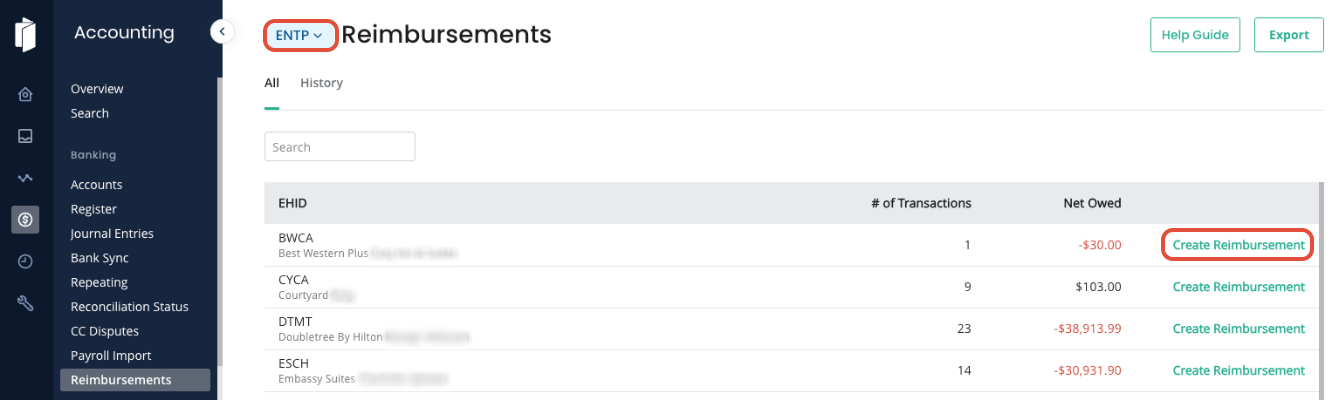
No need to navigate into each individual hotel first — we're restoring the single-page workflow for portfolios that regularly sweep cash to the parent.
After creating the reimbursement, you remain on the Enterprise view with balances updated.
Labor - New Paylocity Payroll Export Template
A Paylocity export template is now selectable on the Payroll Processor page.

This selection produces a Paylocity-ready CSV that conforms to Paylocity’s import specification, so payroll managers can upload directly into Paylocity each pay period without manual reformatting.
Paylocity earning codes are mapped through the existing Payroll Export Code Mapping tab of this page.
Labor - Grouped FEIN Payroll Export for External Processors
Payroll exports for properties that share a FEIN now aggregate hours and calculate blended overtime at the FEIN level - for customers using external payroll processors (ADP, Netchex, UKG, Paychex, and others).
This ensures employees who work across multiple properties under the same EIN are paid compliantly with FLSA blended-overtime rules.
A warning displays if you export before all properties in the group have finalized time, and previously exported periods are flagged for re-export if FEIN-level calculations later change.
Single-property setups are unaffected and continue to work exactly as before.
Labor Reports Now Powered by the New Calculation Engine (including PPR)
The following reports now source wage and labor cost values directly from the New Calculation Engine, including pay-per-room (PPR) wages for housekeepers paid per room cleaned:
- Labor Summary – By Employee
- Labor Summary – By Period
- Time Card Approval – Detail by Employee
- Time Card Approval – Detail by Hotel
The figures you review and approve in these reports match what is processed in payroll, with PPR wages included in all relevant totals.
Labor Management - Performance Page: Remembers Your Filter Selection
The Performance page now remembers the last filter toggle you selected (e.g., daily, weekly, bi-weekly) and restores it on your next visit, instead of always defaulting to bi-weekly.
- Your preference follows you across browsers and devices.
- New users with no saved preference continue to see the bi-weekly default.
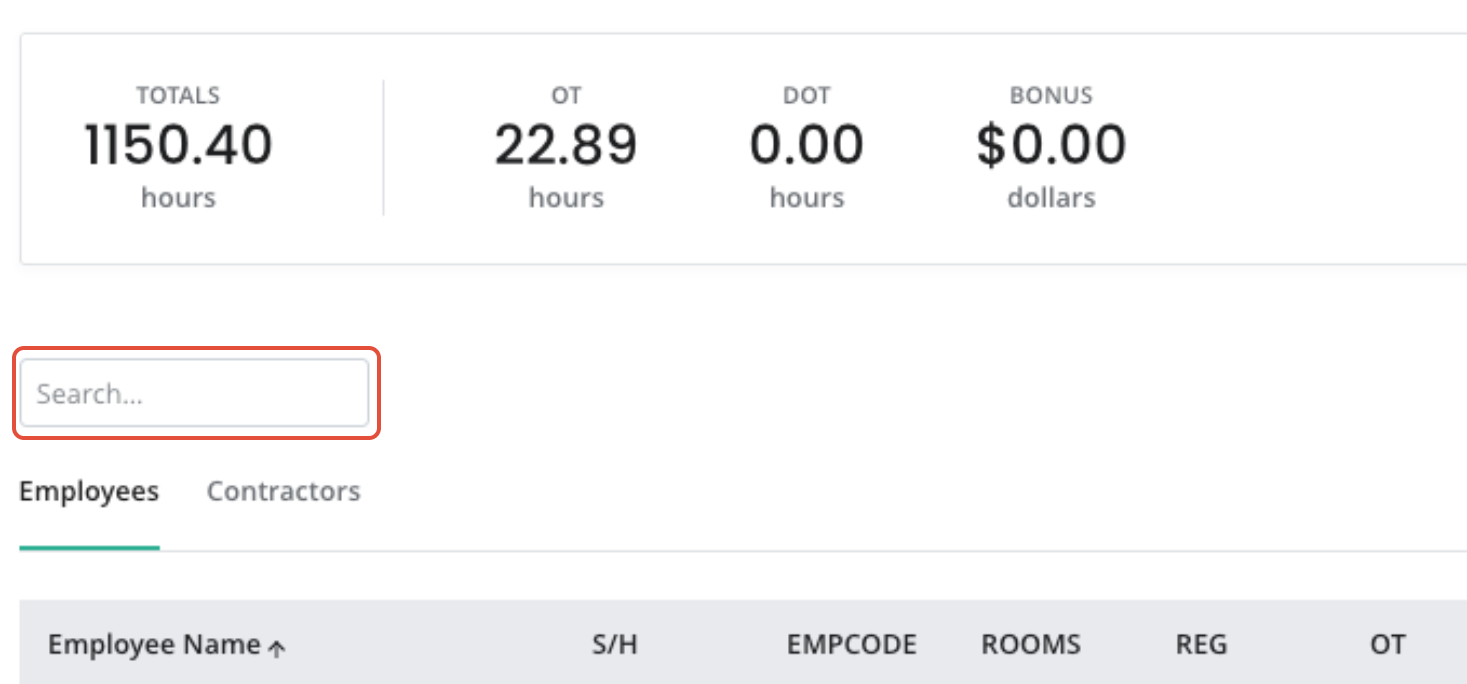
Labor Management - Payroll Page: Search for Employees
The payroll page has been updated to include the Search box to locate specific employees as part of the payroll.
BI: Deposit Audit Total Adjustment Values Shown per Column
On the Deposit Audit page within Business Intelligence, you can now:
- View the total of adjustments made (both at the transaction level and any global adjustments for each type)

Accounting Reports: Daily Snapshot Report Includes LY Variance Option
While configuring the Daily Snapshot Report within Accounting Reports, you can now:
- Optionally choose to include the LY Variance in the report.
- Run the report to show budget variance only, LY variance only, or both.
- Configure this for on-demand report generation and for scheduled emails.
Reporting: Accounting Report Refresh
The refresh icon in the Accounting Report viewer now re-runs the report using your current configuration, instead of simply returning you to the first page.
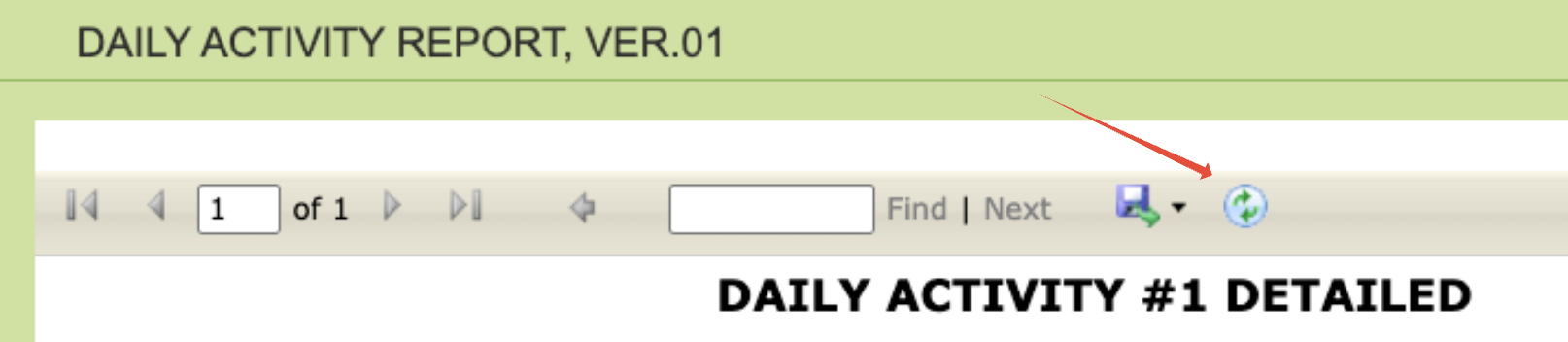
- A loading indicator displays while the report regenerates.
- All Accounting Reports are included in this enhancement.
Was this article helpful?
That’s Great!
Thank you for your feedback
Sorry! We couldn't be helpful
Thank you for your feedback
Feedback sent
We appreciate your effort and will try to fix the article