This article explains how employee timecard approval and attestation work on the Inn‑Flow iPad Time Clock, and how managers and General Managers review and resolve those items.
Overview
Inn‑Flow’s iPad Time Clock includes built‑in timecard review and attestation steps to support accurate payroll processing and compliance with federal and state labor laws. These steps give employees visibility into their punches and provide managers with clear signals when review or correction is needed.
Employees interact with approval and attestation at clock‑out and can also review timecards for the current pay period directly on the iPad after authenticating.
Break Compliance Prompts at Clock‑Out
When an employee clocks out, the iPad Time Clock may prompt them with questions related to required breaks, based on their location and applicable labor laws.
Currently, these prompts support:
- California meal and rest break requirements
- Colorado break requirements
- Federal labor law considerations
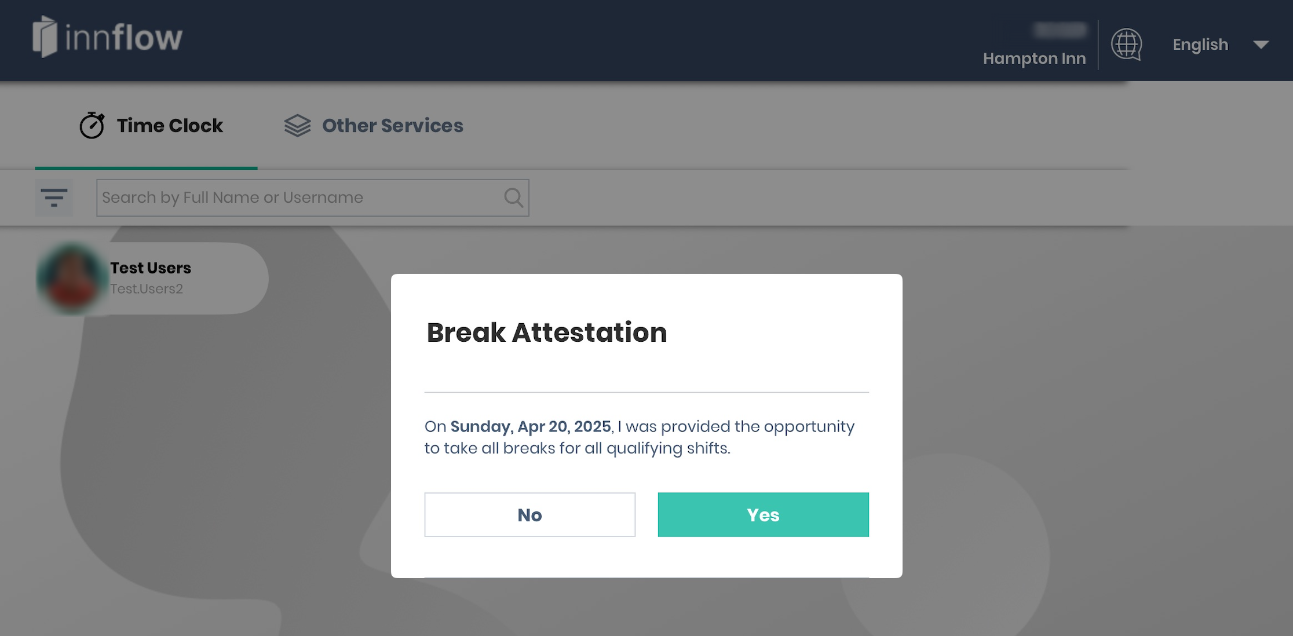
If an employee indicates that a required break was not taken, the shift is flagged for manager review. The employee is also given the opportunity to add comments to provide context.
These prompts do not automatically change punches or hours. They are designed to surface potential compliance issues early and ensure managers have the information needed to follow up.
For more information, see the article: California Break Attestation Time Clock Feature
Timecard Review at Clock‑Out
At clock‑out, employees are shown their timecard for the shift they are ending. At a high level, they can:
- Confirm that the punches are correct, or
- Indicate that something needs review
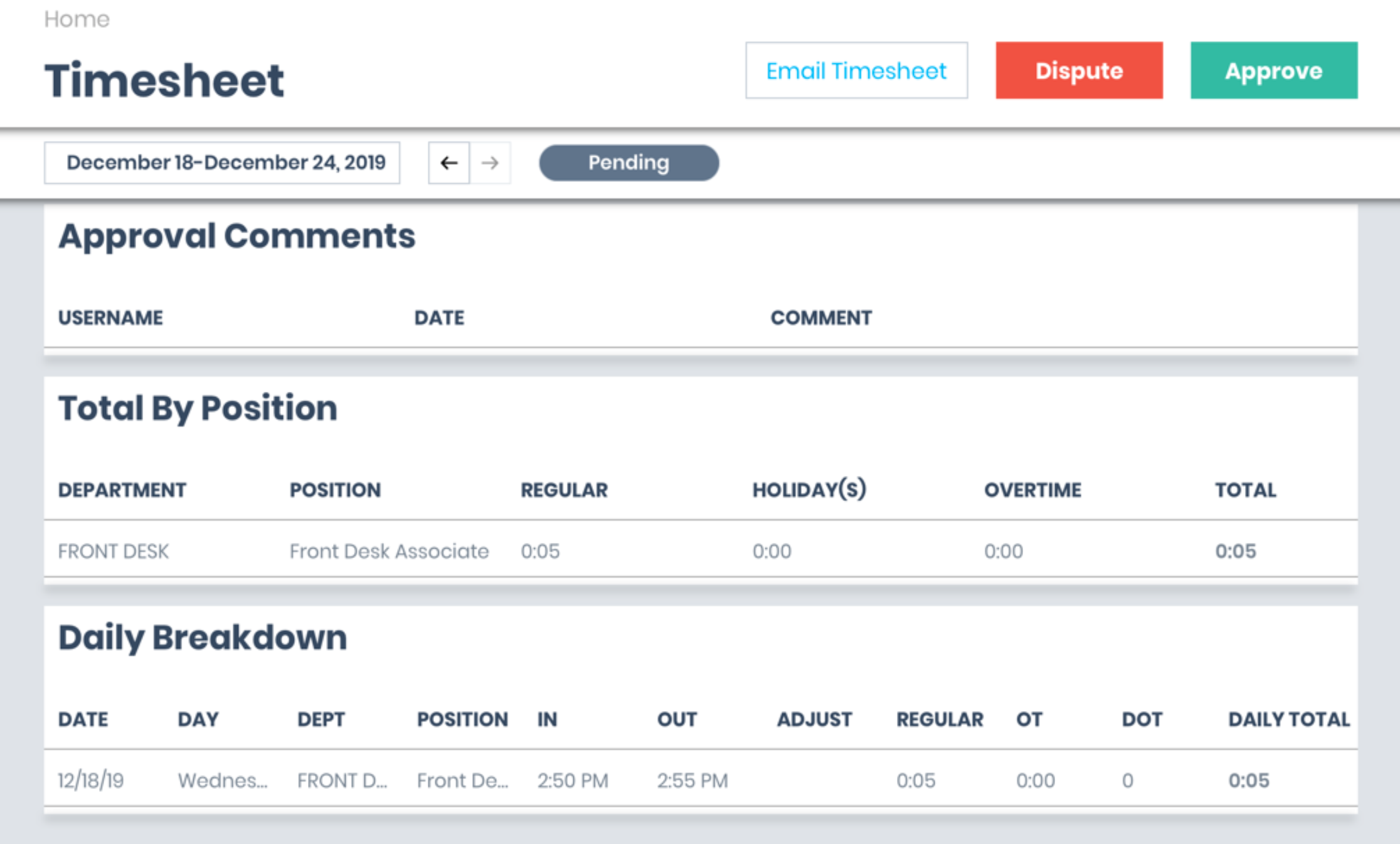
If an employee indicates that their timecard needs review, the shift is flagged and any comments they provide are saved for manager visibility.
Reviewing Timecards on the iPad
After authenticating on the iPad Time Clock, employees can view all of their timecards for the current pay period, not just the most recent shift.
From the iPad, employees can:
- Review past and current shifts
- Approve timecards they believe are accurate
- Request review on past shifts if they notice an issue
This gives employees ongoing visibility into their time and an opportunity to raise concerns before payroll is finalized.
Manager & GM Review
All employee approvals, break responses, and requests for review are visible to managers and General Managers in the Inn‑Flow web application.
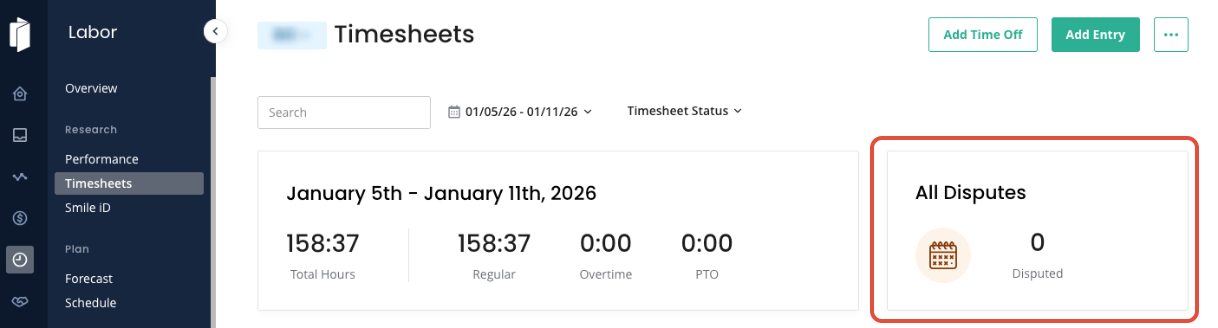
Specifically:
- Flagged shifts and employee comments are visible on the Timecard Detail view
- Managers can review the employee’s punches, responses, and notes in context
Timecards are not locked when an employee requests review. Managers retain full control to:
- Edit punches
- Adjust hours
- Split shifts
- Change positions
- Make any other necessary corrections
Managers are expected to follow up with the employee as needed to confirm details and ensure the final timecard is accurate and compliant.
Final Approval Authority
Employee approval and attestation are an important part of maintaining accurate records, but managers and General Managers retain final approval authority.
Timecards may be adjusted after employee review to:
- Correct errors
- Address missed or incorrect punches
- Resolve compliance‑related issues
This ensures payroll accuracy while maintaining appropriate management oversight.
Key Takeaways for Managers
- Employees are prompted about meal and rest breaks at clock‑out where required by law
- Employees can approve or request review on current and past shifts from the iPad
- Requests for review flag the shift and may include employee comments
- Timecards are never locked by employee actions
- Managers have full editing control and final approval responsibility
These workflows are designed to balance employee transparency, operational efficiency, and labor‑law compliance.
Was this article helpful?
That’s Great!
Thank you for your feedback
Sorry! We couldn't be helpful
Thank you for your feedback
Feedback sent
We appreciate your effort and will try to fix the article