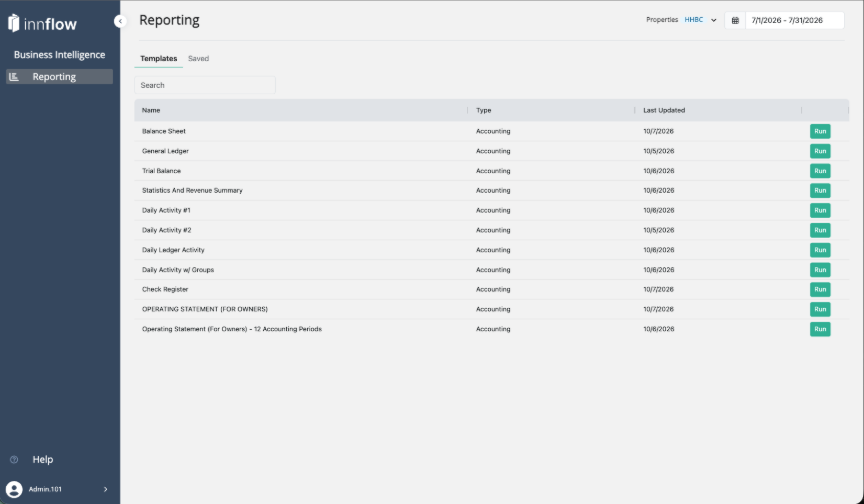
Reporting is a new way to run Inn-Flow's accounting reports, located in Business Intelligence. Choose a report, set the date range and properties, and work with the results directly on screen. You can expand and collapse sections, show only the columns you need, open several reports in tabs, and save the whole set to run again next period.
Reports typically return in seconds, even for multi-property portfolios, so exporting becomes the last step instead of the place where the work happens.
Prerequisites
- Reporting is available starting October 19, 2026.
- No new permission is needed. Your existing Inn-Flow report permissions carry over, and you see only the reports you can already access.
Reports Available at Launch
Report | Type |
Operating Statement (For Owners) | Accounting |
Operating Statement (For Owners) - 12 Accounting Periods | Accounting |
Operating Statement (For Operators) | Accounting |
Balance Sheet | Accounting |
General Ledger | Accounting |
Trial Balance | Accounting |
Statistics And Revenue Summary | Accounting |
Daily Activity | Accounting |
Daily Ledger Activity | Accounting |
Check Register | Accounting |
More reports will be added to Reporting over time, starting with the most-used reports.
Key Terms
Term | What it means |
Templates | The list of reports you can run. Each template is a report that is ready for you to choose a date range and properties. |
Workspace | Where your reports open. A Workspace can hold several reports in tabs, all sharing one date range and one set of properties. |
Saved | The tab where your saved Workspaces are kept, ready to open and run again. |
Report Settings | Options for each report, such as filters and which columns to show. |
How Reporting Works
- Choose a report. Go to Business Intelligence > Reporting and find the report on the Templates tab.
- Set the date range and properties. Select Run, confirm the Date Range and Properties, and run the report.
- Work in the results. The report opens in a Workspace. Switch between Accrual and Cash, expand or collapse sections, and hide columns you don't need.
- Add more reports. Open other reports as tabs in the same Workspace. They use the same date range and properties.
- Save it. Save the Workspace. Next period, open it from the Saved tab and change the date range.
- Export when you're done. Download any report to Excel or PDF.
What Is Different from the Reports You Use Today
- Set it once. You set the date range and properties once for the whole Workspace, not report by report.
- Work on screen. Expand, collapse, sort and hide columns in the report itself instead of rebuilding it in a spreadsheet.
- Portfolio view built in. Run a report for multiple properties and see each property alongside a combined total.
- Save and re-run. Your set of reports and settings is saved, so the next period takes a date change, not a rebuild.
NOTE: The reports you use in Inn-Flow today are still available. Reporting is a new experience alongside them, and nothing about the existing reports changes.
IMPORTANT: When a report includes accounting periods that are still open, a footnote at the bottom lists those periods. Figures for open periods are not final and can change until the period is closed.
Summary
- Reporting is the new way to run accounting reports in Business Intelligence.
- Set the date range and properties once, then work with one or more reports in a Workspace.
- Save a Workspace to run it again next period, and export to Excel or PDF.
- Your existing permissions carry over, and legacy reports remain available.
Was this article helpful?
That’s Great!
Thank you for your feedback
Sorry! We couldn't be helpful
Thank you for your feedback
Feedback sent
We appreciate your effort and will try to fix the article